How to Set Up Slack Integration for RedditMentions
Get instant Reddit mention notifications directly in your Slack workspace. This comprehensive guide walks you through the complete setup process in under 5 minutes, perfect for brand monitoring, lead generation, and competitive intelligence.
What You'll Get
Transform your Reddit monitoring with real-time Slack notifications
Instant Notifications
Get Reddit mentions after every monitoring run instead of waiting for daily email digests.
Team Visibility
Your entire team sees important mentions in a shared Slack channel.
Helpful Formatting
Notifications include highlighted keywords, post previews, and direct links to Reddit.
Minimal Permissions
Only requires basic permissions to send messages and read channel information.
Before You Start
Make sure you have everything you need for a smooth setup
Requirements #
- An active RedditMentions account (start your free 7-day trial if you don't have one)
- Admin or owner permissions in your Slack workspace (or permission to install apps)
- A public Slack channel where you want to receive Reddit notifications
- 5 minutes of setup time
Note: If you don't have admin permissions in your Slack workspace, ask your workspace admin to install the RedditMentions app for you.
Step-by-Step Setup Guide
Follow these simple steps to connect RedditMentions to your Slack workspace
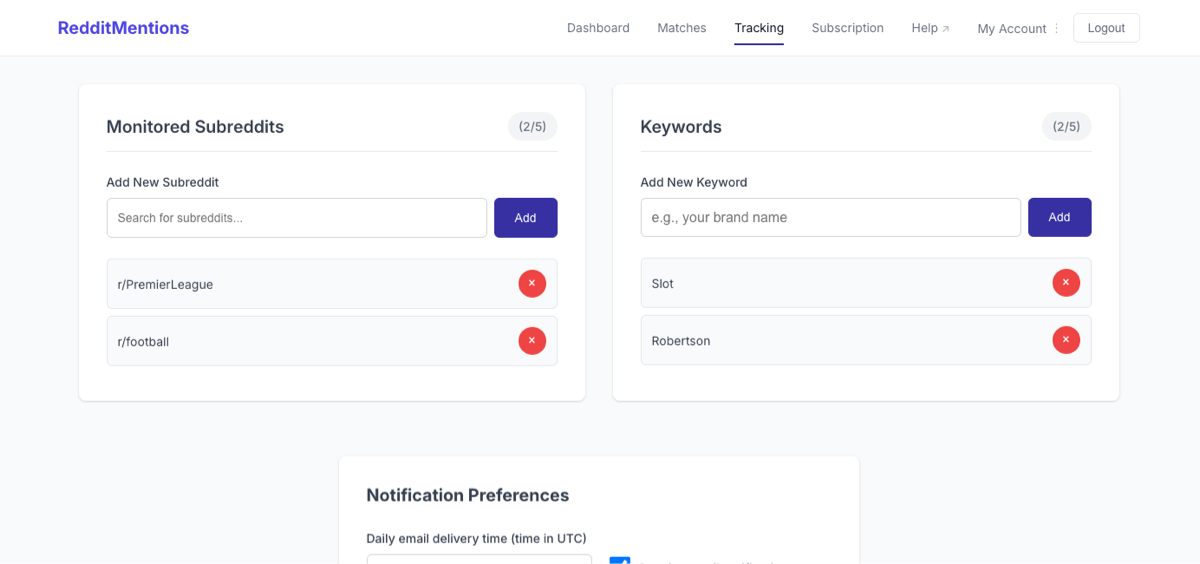
Step 1: Access Your Tracking Settings #
First, log into your RedditMentions account and navigate to your tracking page. This is where you manage your keyword monitoring and notification settings for brand monitoring, lead generation, and other Reddit tracking needs.
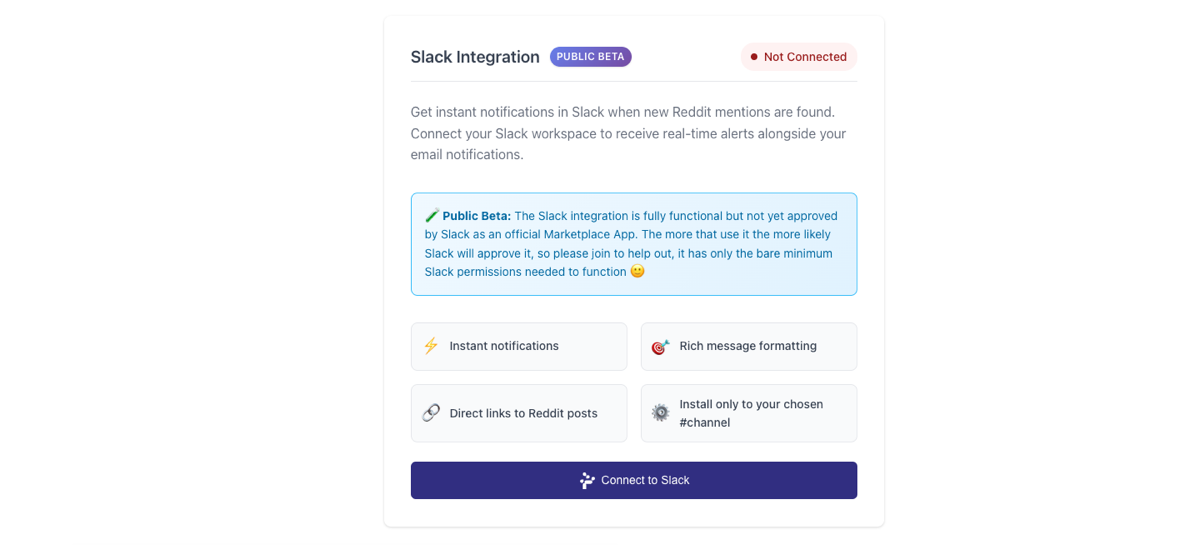
Step 2: Click "Connect to Slack" #
In the Slack Integration section of your tracking page, you'll see a "Connect to Slack" button. Click this button to begin the OAuth authorisation process.
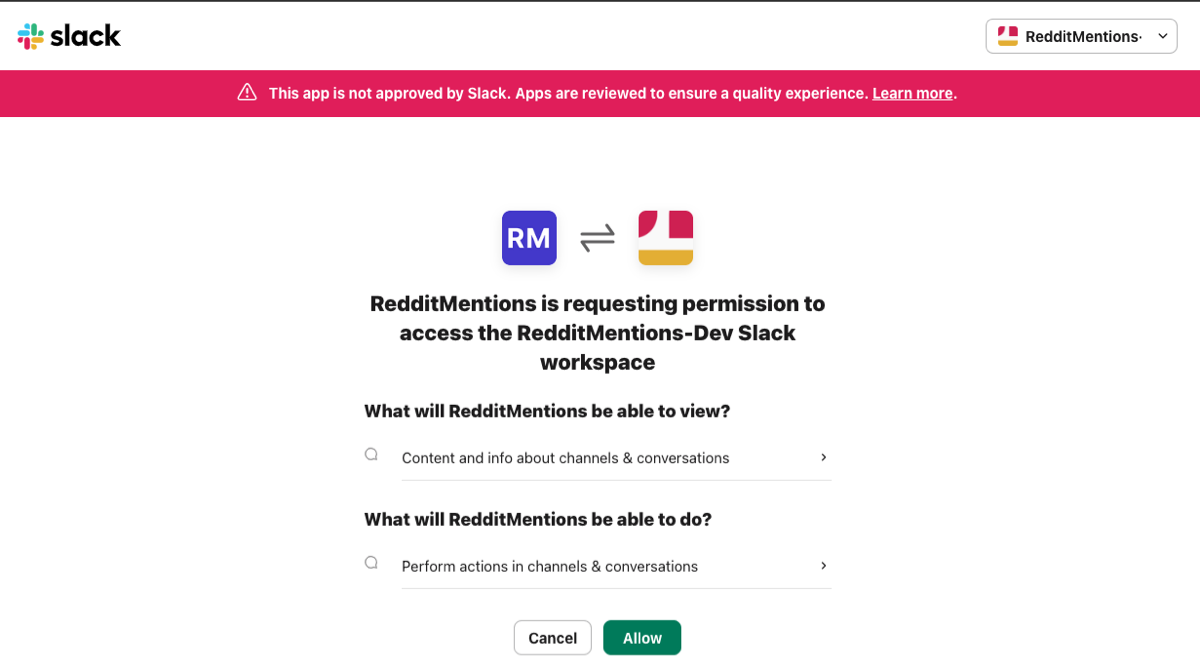
Step 3: Authorize RedditMentions in Slack #
You'll be redirected to Slack's authorisation page. Here's what you need to know about the permissions RedditMentions requests:
Required Slack Permissions
- chat:write - Allows RedditMentions to send messages to your selected channel
- channels:read - Allows RedditMentions to see available public channels in your workspace
Why these permissions? RedditMentions only needs the minimum permissions required to send you notifications. It cannot read your messages, access private channels, or perform any other actions.
Step 4: Select Your Notification Channel #
After authorizing RedditMentions, you'll be redirected back to your tracking page where you can select which Slack channel should receive the notifications.
Channel Selection Tips
- Choose a public channel where your team can see the notifications
- Consider creating a dedicated channel like #reddit-mentions or #social-monitoring
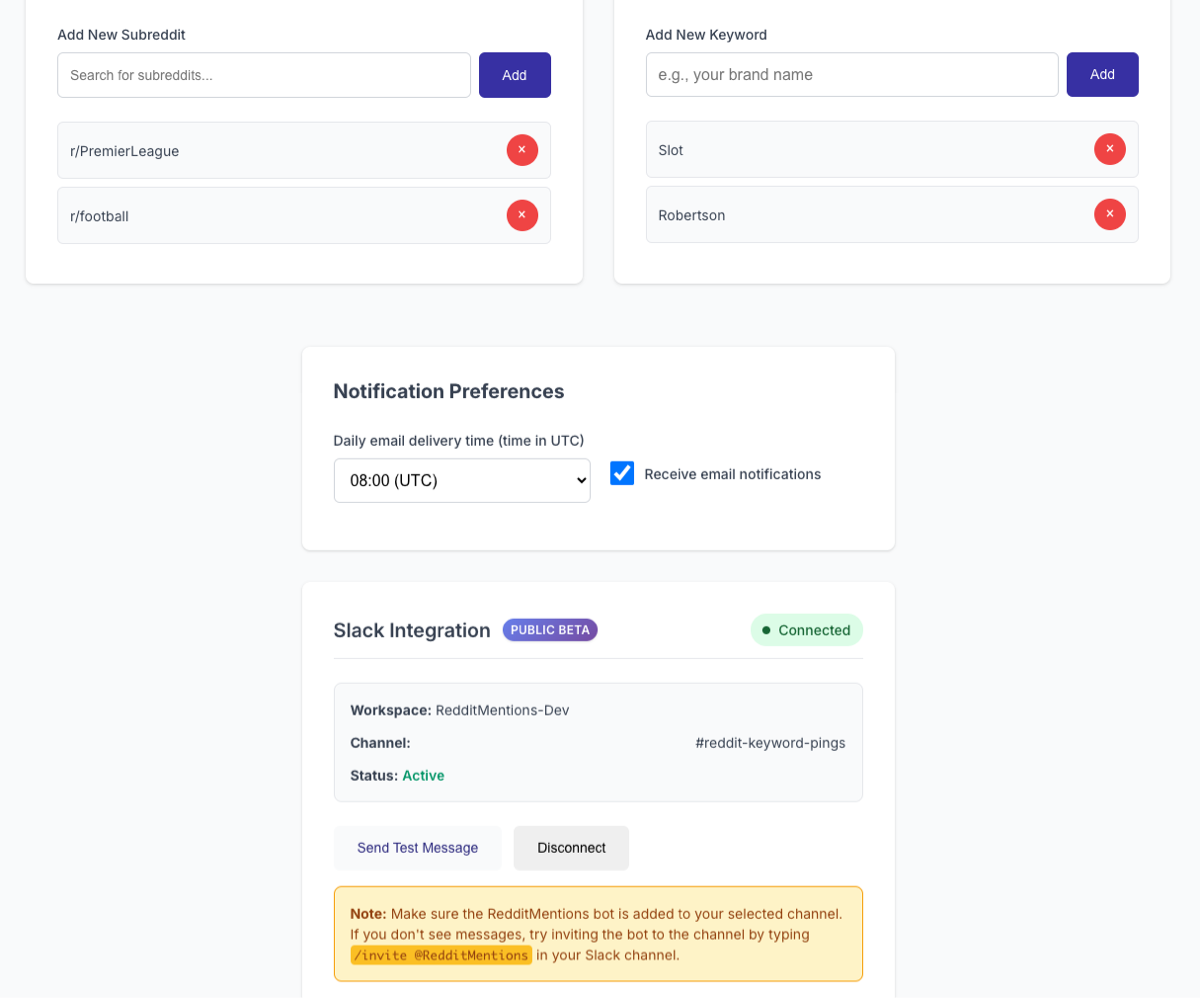
- Make sure the RedditMentions bot is invited to the channel
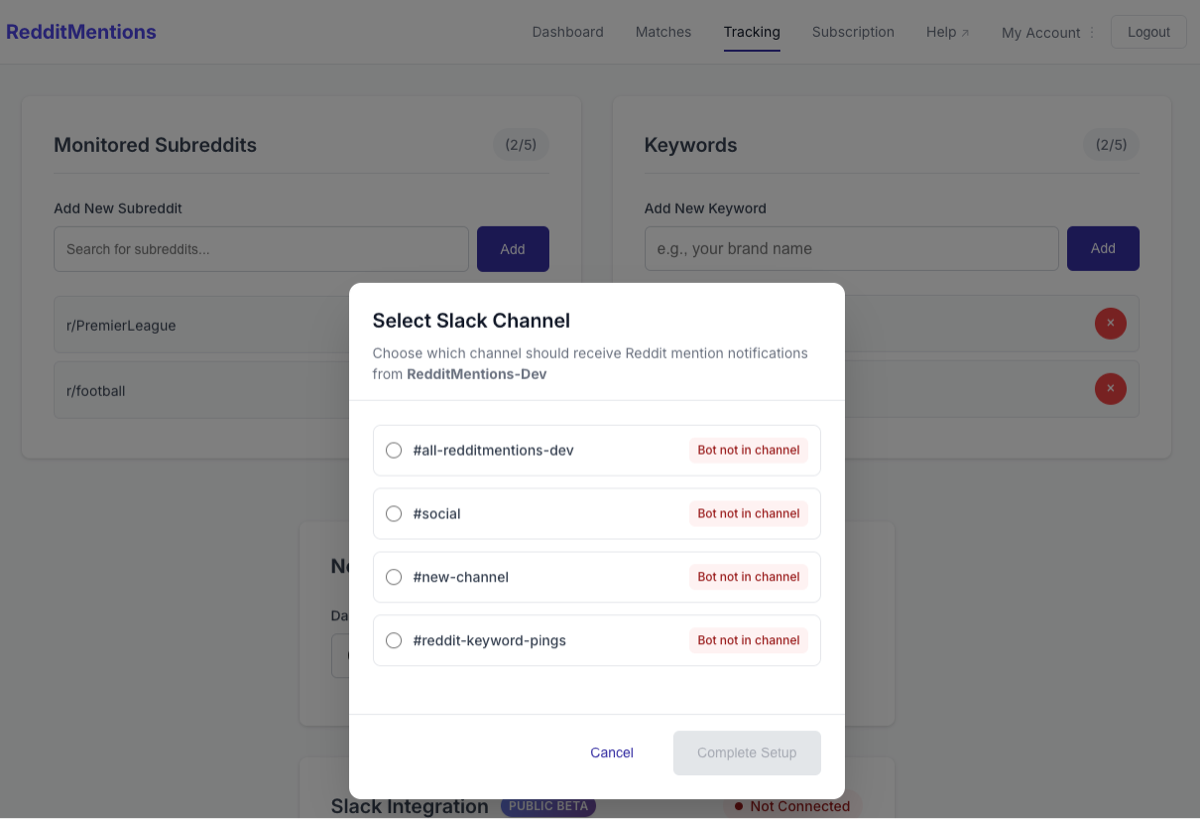
Step 5: Complete the Setup #
Once you've selected your channel, click "Complete Setup" to finish the integration. You'll see a success message confirming that Slack notifications are now active.
What Happens Next
Your Slack integration is now live and ready to send notifications
Testing Your Integration #
You can test your Slack integration immediately using the "Send Test Notification" button in your tracking settings. This will send a sample notification to your selected channel to confirm everything is working correctly.
Notification Format #
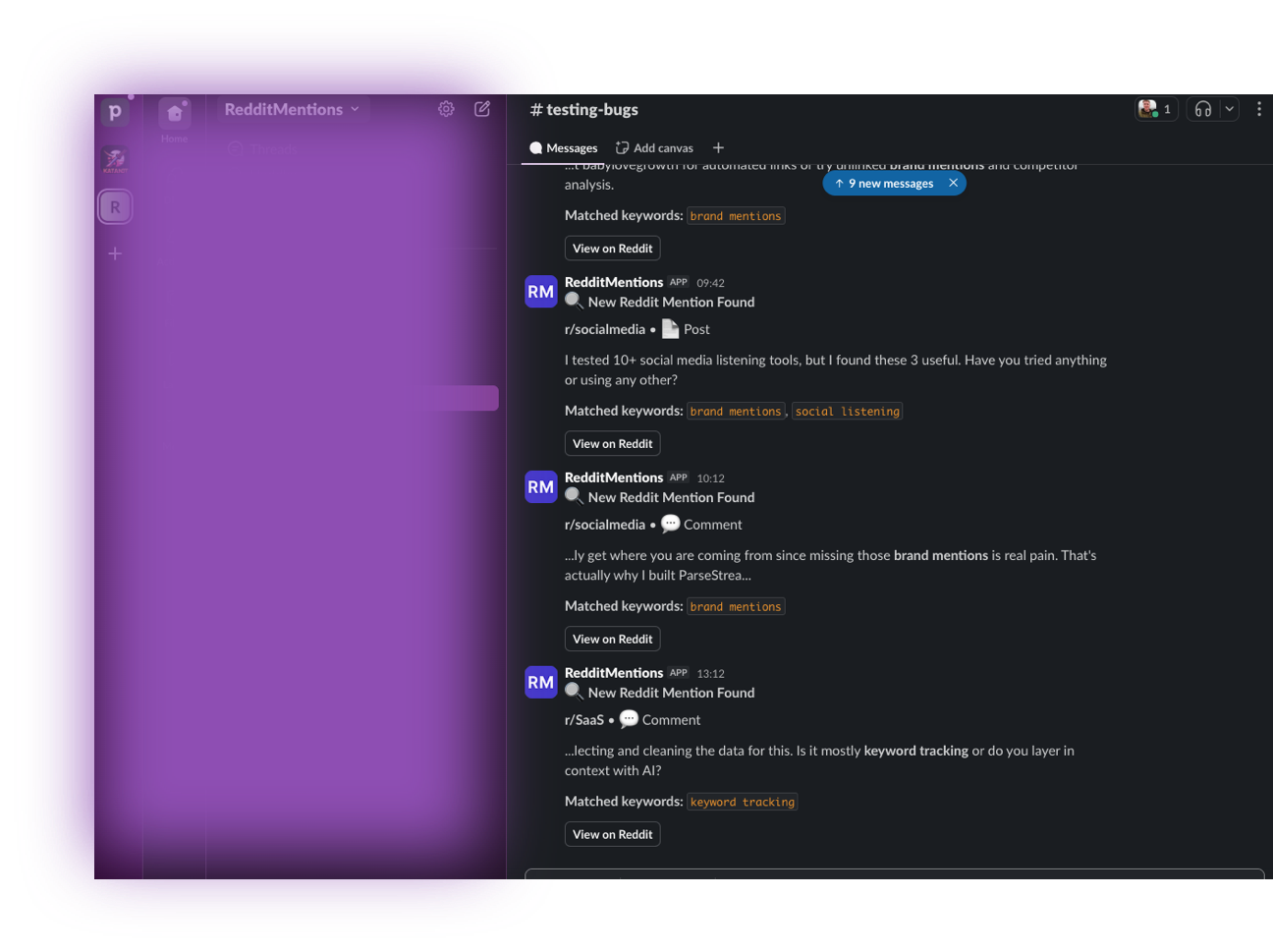
When RedditMentions finds a match, you'll receive a rich notification in Slack that includes:
- Post title and subreddit information
- Highlighted keywords that triggered the match
- Post preview text
- Direct link to view the full Reddit post
- Timestamp of when the mention was found
Notification Timing #
RedditMentions monitors Reddit every 30 minutes, 24/7. This means you'll typically receive Slack notifications between 1-30 minutes of a Reddit post/comment being published that matches your keywords. This real-time monitoring is perfect for brand reputation management and competitive intelligence.
Troubleshooting Common Issues
Solutions to the most common setup problems
"I don't see any notifications in Slack" #
If you're not receiving notifications, check these common issues:
- Verify the bot is in your channel: Make sure the RedditMentions bot is added to your selected channel. You can invite it by typing
/invite @RedditMentionsin your Slack channel. - Check your keyword monitoring: Ensure you have active keywords set up in your RedditMentions account and that monitoring is running.
- Test the integration: Use the "Send Test Notification" button to verify the connection is working.
- Check channel permissions: Make sure the channel is public and the bot has permission to post messages.
"I can't authorize RedditMentions in Slack" #
If you're having trouble with the OAuth authorisation:
- Check your permissions: You need admin or owner permissions in your Slack workspace to install apps.
- Try a different browser: Sometimes browser extensions or settings can interfere with OAuth flows.
- Clear browser cache: Clear your browser's cache and cookies, then try again.
- Contact your admin: If you don't have admin permissions, ask your workspace admin to install the app for you.
"The channel selection is empty" #
If you don't see any channels in the selection dropdown:
- Check workspace permissions: The RedditMentions bot can only see public channels. Make sure you're trying to connect to a public channel.
- Refresh the page: Sometimes the channel list doesn't load properly. Try refreshing the page and going through the setup again.
- Re-authorize: Disconnect and reconnect your Slack integration to refresh the channel list.
Best Practices for Slack Integration
Tips to get the most out of your RedditMentions Slack notifications
Channel Organization #
- Create a dedicated channel: Consider creating a channel specifically for Reddit mentions (e.g., #reddit-mentions, #social-monitoring)
- Set channel purpose: Add a channel description explaining what types of notifications to expect
- Use channel notifications: Enable notifications for the channel so your team doesn't miss important mentions
Keyword Strategy #
- Start specific: Begin with specific keywords to avoid notification spam. Learn more in our complete Reddit monitoring guide
- Monitor performance: Check which keywords generate the most valuable mentions for your brand monitoring or lead generation goals
- Adjust over time: Refine your keywords based on the quality of notifications you receive
Team Workflow #
- Assign responsibilities: Decide who should respond to different types of mentions
- Use Slack threads: Use Slack's threading feature to discuss mentions without cluttering the channel
- Set up alerts: Consider using Slack's notification settings to ensure important mentions get attention
Security and Privacy
Understanding how RedditMentions protects your data
Data Protection #
RedditMentions takes your privacy and security seriously. Here's what you need to know:
- Minimal permissions: RedditMentions only requests the minimum permissions needed to send notifications
- No message reading: The bot cannot read your Slack messages or access private channels
- Secure storage: All integration data is encrypted and stored securely
- Easy removal: You can disconnect the integration at any time from your tracking settings
What RedditMentions Can Access #
✅ What RedditMentions CAN do:
- Send messages to your selected channel
- See the list of public channels in your workspace
- Post Reddit mention notifications
❌ What RedditMentions CANNOT do:
- Read your Slack messages
- Access private channels or direct messages
- See your workspace member list
- Modify or delete messages
- Access any other Slack data
Perfect for All Reddit Monitoring Use Cases
Slack integration enhances every aspect of your Reddit monitoring strategy
Brand Monitoring
Get instant alerts when your brand is mentioned on Reddit. Perfect for reputation management and crisis response.
Learn more →Lead Generation
Find potential customers actively seeking solutions. Convert Reddit discussions into qualified leads.
Learn more →Competitive Intelligence
Monitor competitor mentions and market trends. Stay ahead of your competition with real-time insights.
Learn more →Customer Research
Discover customer pain points and feature requests. Get unfiltered insights to guide product decisions.
Learn more →Pro tip: Combine Slack notifications with our comprehensive Reddit monitoring guide to maximize your RedditMentions investment across all business use cases.
Frequently Asked Questions
Quick answers to common questions about Slack integration
Master Reddit Monitoring with RedditMentions
Complete your Reddit monitoring strategy with these essential resources
Complete Reddit Monitoring Guide
Master Reddit monitoring with proven strategies, tools, and tactics. Complete guide for businesses looking to succeed on Reddit.
Read the guide →Slack Integration Overview
Learn more about RedditMentions Slack integration features, benefits, and how it compares to email notifications.
Learn more →RedditMentions Pricing
Transparent pricing for Reddit monitoring. Choose between Standard (€4.49/month) and Pro (€9.49/month) plans.
View pricing →Ready to Get Instant Reddit Alerts in Slack?
Join teams getting faster response times with real-time Reddit notifications. Setup takes just 5 minutes.